Handcrafted audio plugins for macOS & Windows.
Characterful, analog-inspired processing. Built by a producer, for the studio.
Scroll ↓
Characterful, analog-inspired processing. Built by a producer, for the studio.
Scroll ↓
Saturation · Neural capture
The character of analog outboard gear, neurally captured and fully in your DAW.
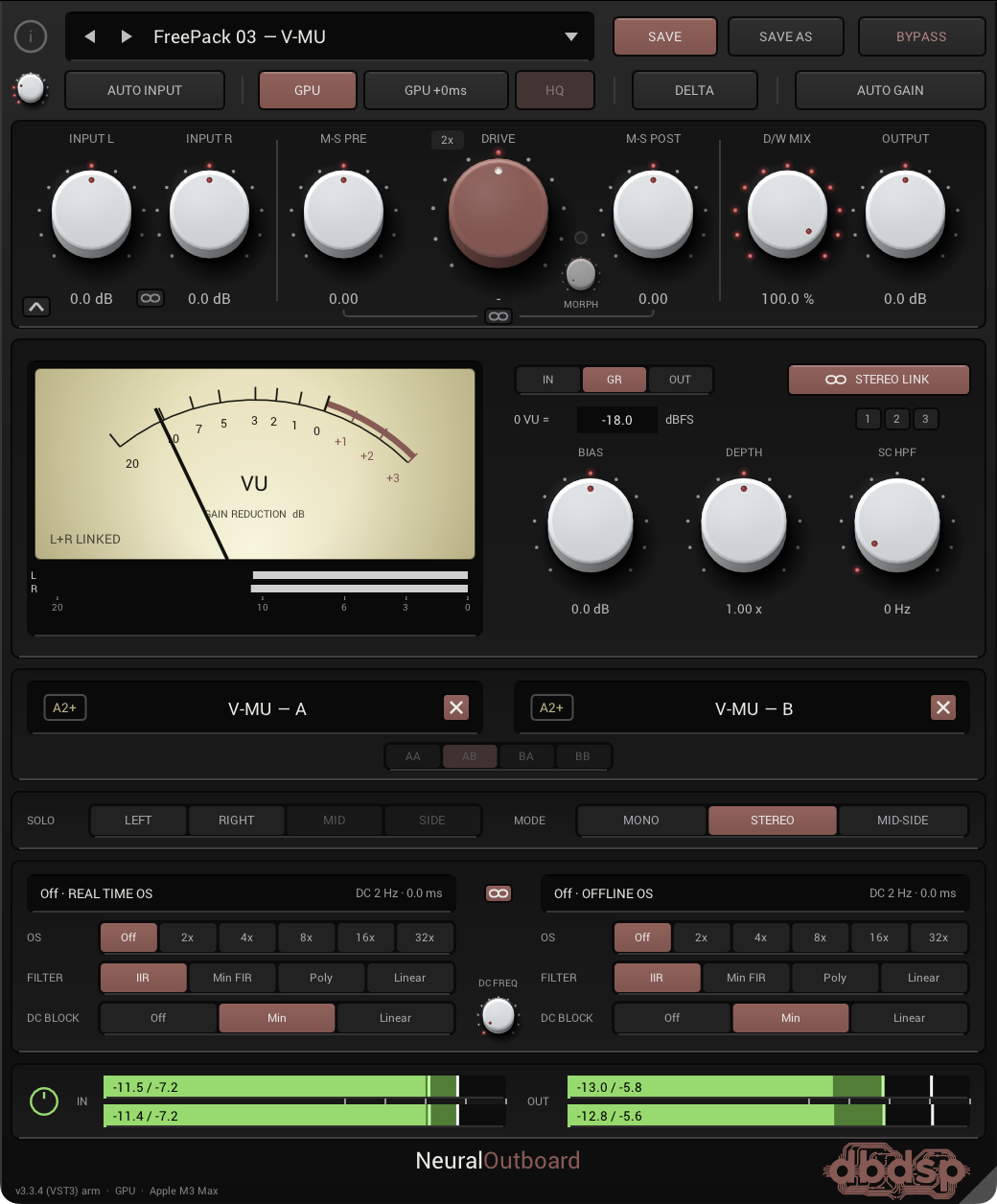
NeuralOutboard runs neural captures of analog hardware so you can print real saturation, harmonics, and color onto any source: vocals, drums, bass, synths, or a full mix.
Load NAM (Neural Amp Modeler) captures into two independent capture slots, drive them as hard as you like, and shape the result with full stereo, Mid-Side, and oversampling control. From subtle mix glue to overt analog grit, it stays clean, precise, and musical.
GPU acceleration
Run the neural model on your graphics card instead of your CPU. One button, no setup. It makes oversampling factors practical that a CPU cannot manage at all: at 32×, where CPU-only fits no instances, a MacBook Pro M3 Max runs six. Metal on macOS, Direct3D 12 on Windows.
Zero-latency GPU mode
A second mode adds no latency at all, for tracking and monitoring through the plugin. Fewer instances than the standard GPU mode, but nothing to compensate for.
Neural capture engine
Load NAM (.nam) captures into two independent slots, with full support for the new A2 architecture as well as legacy A1 models, and reproduce the saturation and harmonic character of analog gear.
NAM Sets & Morph
A single preset can hold a whole series of captures, one unit taken at several drive settings for instance, swept smoothly with one Morph knob and fully automatable.
Fourteen free factory packs
Curated capture packs of real hardware are included free with the plugin. They come with the installer, so you tick the ones you want, and they appear in the preset menu on their own.
Drive & D/W Mix
Push into the model for richer harmonics, then blend processed and dry signal for parallel saturation.
Stereo & Mid-Side
Process in Left, Right, Mid, Side, Mono, Stereo, or Mid-Side, with dedicated M-S pre and post balance.
Oversampling
Up to 32×, removing all digital aliasing, with independent real-time and offline render settings and IIR, Min-FIR, Poly, or Linear filters. The oversampling engine was rebuilt in 3.2 and runs roughly three times faster, which is what lets the GPU reach the instance counts above.
Aligned at every setting
Latency is measured per model and reported to your DAW, and the dry path is aligned inside the plugin, so D/W Mix stays phase-correct at any oversampling factor or filter, and your host compensates the rest automatically.
Precision controls
DC-block filtering, Delta monitoring, Auto Input and Auto Gain, stereo-linked input, and output trim.
Presets & metering
Save and recall your own presets, with full input and output metering throughout the chain.
MAX banks
Captures taken with a tube, transformer or tape pushed to its ceiling, so rolling the Drive back walks you down through every stage of saturation, from fully driven to clean.
Try the full plugin free for 14 days. Every feature, nothing held back. Buy anytime to make it permanent; your install carries over, no reinstall needed. Both macOS and Windows installers are included with every purchase and trial.
Both installers are signed. The macOS installer is Apple-signed and notarized; the Windows installer is code-signed. On Windows the publisher shows as Dariusz Baj, the developer behind dbdsp audio.
Launching soon. Purchasing and the free 14-day trial will be available here shortly. Email info@dbdspaudio.com to be the first to know.
About
dbdsp audio is an independent audio-software studio creating professional plugins for music producers, engineers, and musicians on macOS and Windows. Built by a producer, the catalog focuses on characterful, analog-inspired processing: effects designed to bring warmth, color, and hands-on musicality to the modern studio. Every plugin is handcrafted, delivered in industry-standard Audio Unit, VST3 and AAX formats, and sold as a digital download.